Through our helpdesk, you can easily submit a ticket without logging in. This is useful if you are not active in Telegram but still want to receive support quickly. Below you will find step-by-step instructions on how to create a ticket via help.mijnsupportdesk.com.
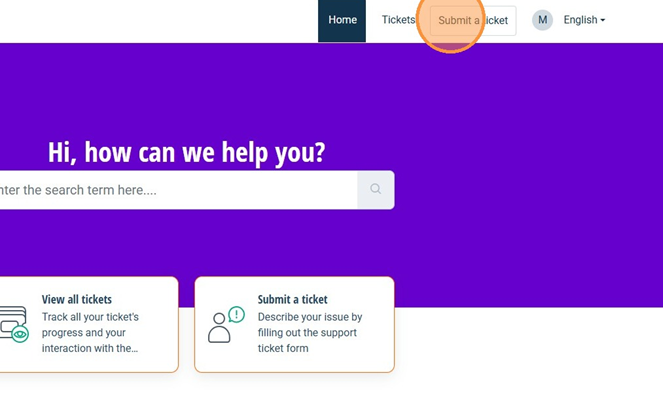
At the top of the page, you will see the Submit a ticket button. Click this to open the request form.
In the form, first select the Type Ticket to indicate the type of request. Choose Contact us if you want to contact our support team directly. Choose Contact my client(s) if you would like us to contact your customer.
After making your selection, the required fields will appear.
Enter your own email address in the E-mail field so we can reach you. In the Subject field, provide a short summary of your question or issue. In the Description field, you can explain your situation in more detail. The clearer your description, the faster we can assist you.
Also make sure to select the appropriate Priority for your request, so we can assess the urgency correctly and handle your ticket as efficiently as possible.
Was this article helpful?
That’s Great!
Thank you for your feedback
Sorry! We couldn't be helpful
Thank you for your feedback
Feedback sent
We appreciate your effort and will try to fix the article